


How to Submit Your Severance Documents
Scenario 1
Scenario 2
Scenario 3
Leaving Korea before the 10th of the following month after resignation date.
Submit the following documents:
-
Copy of your Outbound Flight Ticket (one-way ticket)
-
Copy of your Valid Passport.
-
Copy of your Korean Checking Account
-
Copy of your Resident Card (ARC)
Remain in Korea after the 10th of the following month after resignation date.
Submit the following documents:
-
Copy of your IRP Account
-
Copy of your Resident Card (ARC)
All F-Visa holders and Korean Citizens
Submit the following documents:
Copy of your IRP Account
Copy of your Resident Card (ARC)

Your future plans following your departure from our company will dictate the necessary severance documents you need to provide. We kindly request that you identify the situation that best corresponds to your circumstances and submit the requisite documents in accordance with that scenario.
Please choose the scenario below that best matches your situation and submit the appropriate documents accordingly.
Important Note:
-
Severance deposited into non-IRP accounts will be taxed before it is disbursed. If you plan to leave Korea before receiving your severance, kindly consult your bank representative about setting up a dedicated/automatic remittance account, such as Hanabank’s Easy-One Remittance Service. Please check that your bank account has been updated with your Residence card (ARC) number if you initially created the account with only your passport information.
Scenario 2
Scenario 3
Important Note:
-
When renewing or changing your visa, kindly ensure that you establish an Individual Retirement Pension (IRP) account prior to submitting your Residence card (ARC) to immigration.
Scenario 2
Scenario 3
Important Note:
-
When renewing or changing your visa, kindly ensure that you establish an Individual Retirement Pension (IRP) account prior to submitting your Residence card (ARC) to immigration.
Scenario 2
Scenario 3
Checklist
Checklist
Checklist
-
Flight ticket must show your full name and complete flight information
-
Bank book copy must display your full name and complete banking details. No partial copies will be accepted.
-
Submit copies of both sides of your Residence Card (ARC).
-
Files must be submitted in PDF, JPEG, or PNG format.
-
All images must be high resolution with no light reflections or blurring.
-
IRP bank book copy must display your full name and complete banking details. No partial copies will be accepted.
-
If you are using an IRP account from a previous year, check your bank to see if its active. IRP accounts automatically close after 1 year of inactivity.
-
Submit copies of both sides of your Residence Card (ARC).
-
Files must be submitted in PDF, JPEG, or PNG format.
-
All images must be high resolution with no light reflections or blurring.
-
IRP bank book copy must display your full name and complete banking details. No partial copies will be accepted.
-
If you are using an IRP account from a previous year, check your bank to see if its active. IRP accounts automatically close after 1 year of inactivity.
-
Submit copies of both sides of your Residence Card (ARC).
-
Files must be submitted in PDF, JPEG, or PNG format.
-
All images must be high resolution with no light reflections or blurring.
Failure to submit the required documents correctly may result in delays in processing your severance. Please ensure all documents are submitted accurately.
Additionally, all documents related to your severance should be submitted prior to your resignation date to minimize the potential for processing delays. The earlier you submit these documents, the more efficient the process will be.
Send all requested documents to facultylink@creverse.com
How will I know if I received my Severance?
Depending on where your severance is deposited, you will receive your severance payment on the 10th of the scheduled month from Wooribank (퇴직연금우리은행), not from CREVERSE, since Wooribank manages the company’s severance fund. This is not your Pension Lump-sum refund, so please refer to the Pension section.
SAMPLE ACCOUNT
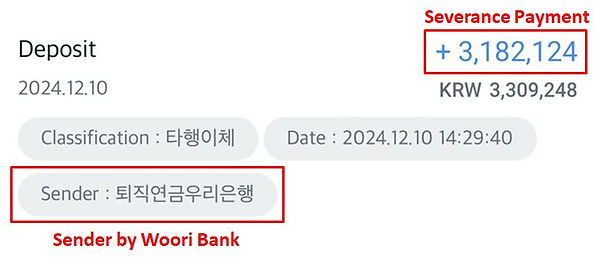
*Please be aware that severance payments are typically deposited later in the afternoon, so it’s best to check your bank account around that time.
SEVERANCE DOCUMENT SAMPLES
OUTBOUND FLIGHT e-TICKET SAMPLE
The copy of your plane ticket must state that it's an e-Ticket and not simply just a receipt.
The e-Ticket must include your Full Name and your Departure Date in order for it to be processed. Please note the sample e-Ticket.

IRP BANK BOOK SAMPLE
The IRP Bank Book or Regular Bank Book copy can only be in one of 2 formats: It can either be a photo of the actual IRP bank book with your personal information on it, or it can be a digital copy of your IRP bank book that you can download directly from your bank app. Please refer to the two sample pictures below as the copy we will need will closely resemble the samples below.
ACTUAL IRP BANK BOOK
DIGITAL IRP BANK BOOK

*To obtain a copy of your digital bankbook, please access your bank app and do the following: Click the three dots next to your regular bank account > click 계좌 관리 > click 계좌 정보 > and on the bottom click 통장 사본 and press 이미지 저장 to save the image. Process may differ depending on the app.

How To Create an IRP Bank Account Using your Bank App Guide
RESIDENCE CARD (ARC) SAMPLE
In addition to the aforementioned document, you will also need to send us a copy of your ARC card Back and Front side. Please make sure the copy is clearly legible.
FRONT SIDE
BACK SIDE
